
A standup and a customer call need different notes. After a standup you want each person's progress and blockers. After a customer call you want their goals, objections and the next step. Poffle chooses a notes template from the meeting's title, so the notes it writes on your Mac follow the shape of the meeting.
There are five templates besides General: 1:1, Standup, Interview, Customer call and Planning. A template adds focus and section names. The content still comes only from what was said.
How Poffle picks a template
When a recording is linked to a calendar event, Poffle looks for keywords in the event's title. Matching ignores upper and lower case and accents, and only whole words count.
| Template | Title words that choose it |
|---|---|
| 1:1 | 1:1, 1-1, 1/1, 1 on 1, 1 to 1, one on one, one-to-one |
| Standup | standup, stand-up, daily, dailies, scrum |
| Customer call | customer, client, sales, discovery, prospect, user interview, user research, demo |
| Interview | interview, candidate, screening, phone screen |
| Planning | planning, sprint, retro, retrospective, roadmap, kickoff, kick-off, OKR |
Poffle checks in that order, with “demo” last, and uses the first match. So “User interview with Acme” becomes a Customer call and “Sprint demo” becomes Planning. The word “daily” anywhere chooses Standup, which suits “Daily standup” but also catches “Daily design review”. Common title words in Poffle's other languages are recognised too, such as Kundenmeeting, entrevista, planering or 商談. Japanese, Korean and Chinese terms count anywhere in the title, even without spaces around them.
A title with none of these words gets the General template. A call recorded without a calendar event is named after its app, such as “Zoom call”, so it also starts as General.
What each template focuses on
| Template | Section names | What it pays attention to |
|---|---|---|
| 1:1 | Updates, Feedback, Blockers, Growth | Updates, feedback in either direction, blockers, and growth or career topics. |
| Standup | Progress, Plans, Blockers | Each person's progress, plans and blockers, by speaker. Routine plans for the day are not action items. |
| Interview | Background, Strengths, Concerns, Follow-ups | The candidate's background, stated strengths, concerns and follow-ups. No rating. |
| Customer call | Goals, Pain points, Requests, Objections, Next steps | The customer's goals, pain points, requests and objections. A feature request is not an action unless someone commits to it. |
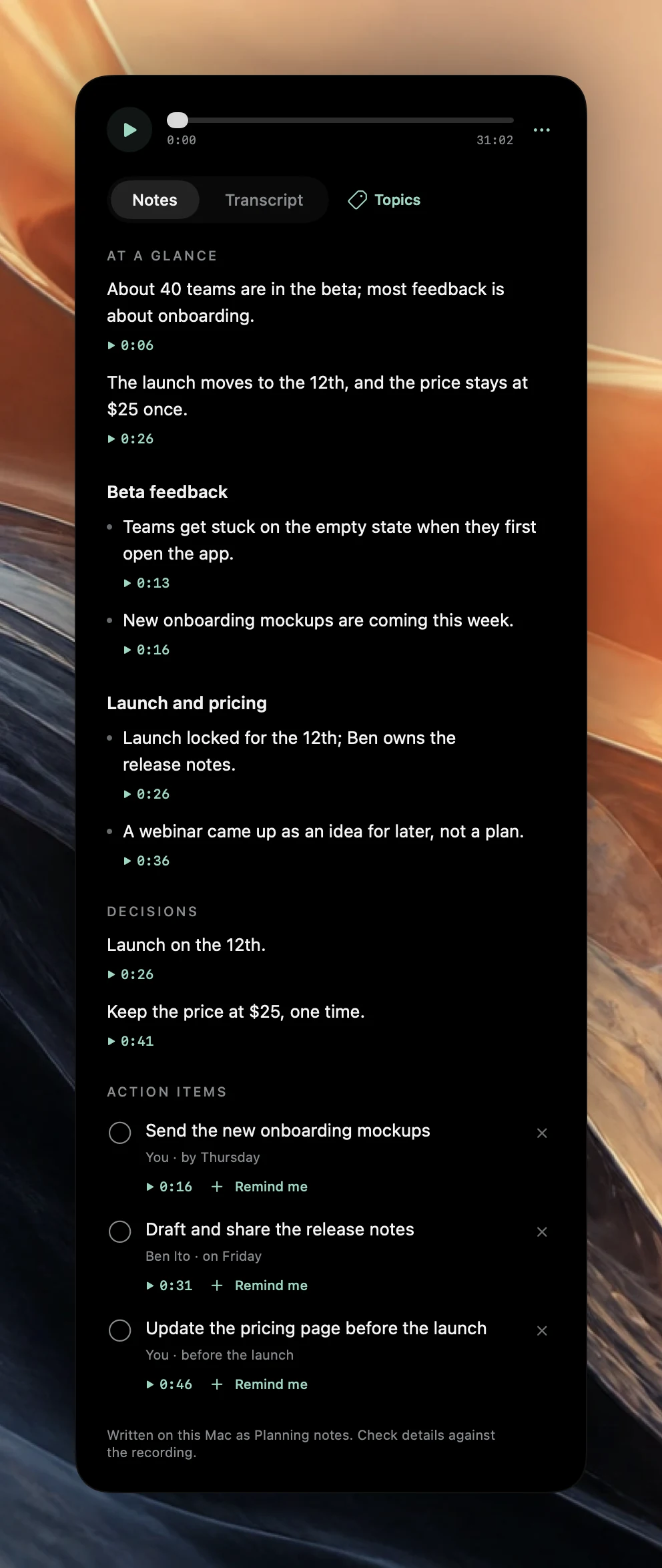
| Planning | Goals, Scope, Risks, Owners and dates | Goals, scope, risks, owners and dates, as stated. |
Section names are guidance, not a form to fill. If nobody mentioned a risk, the Planning notes will not invent one, and a section with nothing in it is left out. The usual parts of every meeting's notes stay the same: At a glance, Decisions and Action items with owners and spoken due dates. Automatic meeting notes and action items explains how those are chosen.
For what good notes contain in each kind of meeting, with a template you can copy, see the guides to 1:1 notes, standup notes, interview notes, customer call notes and sprint planning notes.
The Interview template and fair notes
Interview notes carry more risk than most. The Interview template tells the model never to note, infer or evaluate age, gender, ethnicity, nationality, religion, health, disability, family or other protected characteristics, and not to rate the candidate. It records what the candidate said about their background and work, the concerns raised, and the follow-ups agreed.
That rule shapes what Poffle writes. It cannot change what was said in the room, and it does not replace your organisation's hiring process. Read interview notes before you share them, and ask the candidate before you record.
Switch the template after the meeting
- Open the meeting and click the options button (three dots) next to the playback bar.
- Choose Rewrite notes as, then pick a template. The current one has a tick.
- Wait while Poffle writes the notes again from the saved transcript, on this Mac.
Choose Automatic to go back to detection from the title. Completed actions and actions already linked to Apple Reminders are kept. If the new notes cannot be written, the previous notes come back. The template is saved with the notes, and the footnote names it: “Written on this Mac as Planning notes. Check details against the recording.”
Rewrite notes as needs a saved transcript and is unavailable while the meeting is recording or still being processed. Writing the new notes needs Apple Intelligence, like the first time.
Name meetings so detection works
The simplest way to get the right template is a clear calendar title. It also makes meetings easier to find later.
- Put the meeting type in the title: “1:1 Ana and Ben”, “Acme discovery call”, “Sprint 42 planning”.
- Keep recurring titles stable. The same title helps Poffle show the notes from last time before the next one.
- Watch for accidental keywords. A “Client dinner planning” title chooses Customer call, because “client” is checked before “planning”.
- For a call recorded without an event, pick the template afterwards with Rewrite notes as.
What a template cannot do
A template changes emphasis. It does not add facts, and it does not turn a vague meeting into a structured one. If a planning meeting never named an owner, the Owners and dates section will be thin, and that is useful information too.
All templates work in the meeting's transcription language, with Apple Intelligence on the Mac. If Apple Intelligence is unavailable, the transcript is still prepared and you can write notes later. To see the templates on your own meetings, download Poffle, give a test event a clear title and record a few minutes with someone who agrees.
Sources
Official documentation and references used in this guide.