
A 1:1 is where small things get said that matter later: a piece of feedback, a worry about workload, an offer to help with a promotion case. Few of those survive a week in memory. Short, consistent notes give both people the same record, and they let the next conversation start where the last one ended.
Good 1:1 notes are not minutes. They are a handful of lines under the same headings each time, plus the commitments either person made. This guide gives you a template you can copy into any notes app, then shows how Poffle writes the same structure from a recorded conversation on your Mac.
What belongs in 1:1 notes
Keep the same headings every week. Consistency is what lets you scan three months of notes in a minute.
- Updates. Only what changed since last time and matters to the other person. A 1:1 that turns into a status report crowds out everything else.
- Feedback. In both directions. Write the specific behaviour and its effect, not a verdict: “The handover doc arrived the day before the release, so QA had no time to test the edge cases.”
- Blockers. What is in the way and who will try to remove it. A blocker without a name next to it tends to come back next week.
- Growth. Career goals, skills, the project someone wants to try. These threads run for months, so a dated line each time is more useful than a long paragraph once.
- Commitments. Who will do what, and by when. This is the part people forget first.
A 1:1 template you can copy
Paste this into Apple Notes, a shared document or a text file. Fill it in during the last five minutes, or straight after the meeting while it is fresh.
1:1 · [Name] and [Name] · [Date]

Carried over from last time
- [ ] [Open commitment from the previous 1:1]

Updates
- [What changed since last time]

Feedback
- To [Name]: [what happened] and [its effect]
- From [Name]: [what happened] and [its effect]

Blockers
- [Blocker] · who will act: [Name]

Growth
- [Goal or topic] · next step: [step]

Commitments
- [ ] [Name] will [task] by [date]
The first section is the one that makes a recurring meeting work. Before the next 1:1, copy the unchecked commitments into it and start there.
Write lines that still make sense later
Notes are read weeks after the meeting, often by someone checking what was agreed. Write each line so that it stands on its own.
| Instead of | Write |
|---|---|
| Talked about the roadmap. | Sam wants to own the import redesign next quarter. We'll raise it at planning on 3 November. |
| Feedback on the demo. | The demo ran 10 minutes over. Next time Sam will cut the setup section and start with the result. |
| Will look into it. | Alex will ask Finance about the training budget by Friday. |
Name the subject instead of writing “it” or “that”. Put a date in when one was said. If nobody gave a date, leave it out rather than guessing; an invented deadline causes more trouble than a missing one.
Keep personal topics proportionate
1:1s sometimes cover health, family or other personal matters. Write only what you both need to act on, and agree on what goes into shared notes. “Sam is taking Thursday afternoons off for the next month; cover agreed with Priya” is enough. The details can stay in the conversation.
If you record a 1:1, say so at the start and give the other person a real choice. A recording can make people more careful about what they say, so some pairs record only part of the meeting, or write notes by hand instead. Either works. Doing it the same way every week matters more than the method.
How Poffle writes 1:1 notes
Poffle records your microphone and Mac audio in separate tracks and transcribes them on your Mac. When Apple Intelligence supports the language, it also writes notes on-device. Those notes have templates, and the 1:1 template adds the headings above: Updates, Feedback, Blockers and Growth. It asks the model to pay attention to feedback in either direction and to career topics.
- Open the 1:1 in Poffle's Agenda and choose Record meeting in its Meeting notes section. Tell the other person before you start; Poffle does not announce recordings.
- Poffle picks the template from the event title. Titles containing “1:1”, “1-1”, “1 on 1”, “one on one” or “one-to-one” use the 1:1 template.
- After you stop and save, open the notes. Commitments appear under Action items with an owner and any date that was spoken, for example “You · by Friday”.
- Choose Remind me on an action to add it to Apple Reminders, with an optional date and time.
If the title doesn't say 1:1, for example a recording named after the call app, open the meeting's options menu, choose Rewrite notes as, then 1:1. Poffle writes new notes from the saved transcript and keeps completed actions and actions already linked to Reminders. The line under the notes confirms the style: “Written on this Mac as 1:1 notes. Check details against the recording.”
The headings are guidance for the model, not a form it must fill in. If you didn't discuss growth this week, there is no Growth section. Each point links to the passage it came from, so you can play the moment and check the wording before you rely on it. The templates guide covers detection and rewriting in more detail.
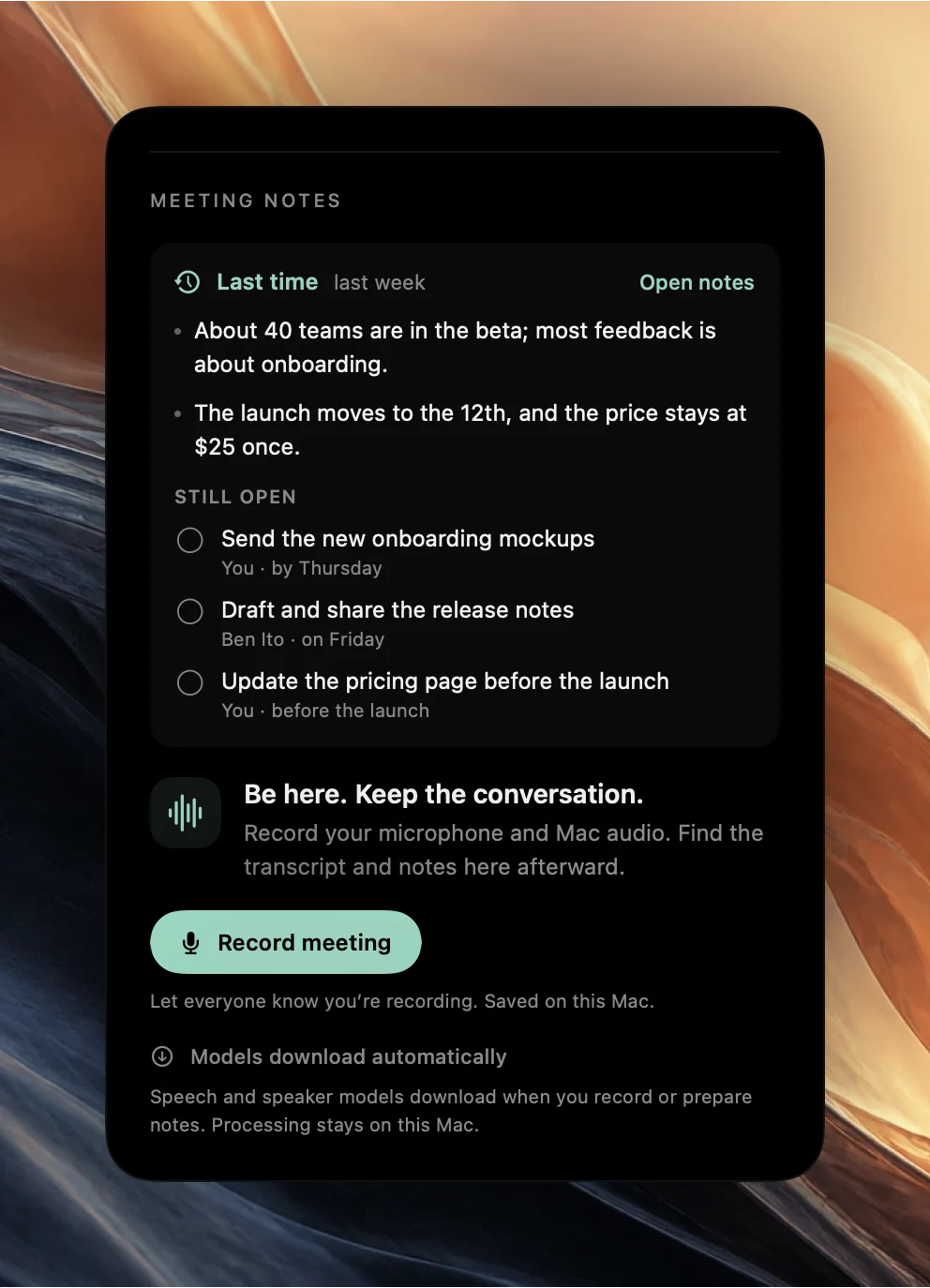
Start the next 1:1 where this one ended
For a recurring 1:1, the next occurrence in Agenda shows a Last time brief before you record: up to three points from the previous meeting and up to five Still open actions from the last three meetings in the series. Tick an action off there when it is done. That is the “carried over” section of the template, filled in for you. See how to prepare for a recurring meeting for how Poffle recognises meetings in the same series.
Recordings, transcripts and notes stay on your Mac. Written notes need a Mac and a language that Apple Intelligence supports; without it, the transcript is still there to read and search.
Sources
Official documentation and references used in this guide.