
Sprint planning notes get read at an awkward moment: halfway through the sprint, when someone asks whether a piece of work was ever in scope. Good notes answer that in seconds. They state the goal, what is in and out, the risks people raised, and who owns what by when.
What planning notes need to answer
The Scrum Guide frames Sprint Planning around three topics: why the sprint is valuable, what can be done this sprint, and how the chosen work will get done. The sprint goal must be settled before planning ends. See the Scrum Guide for the details. Whether or not your team uses Scrum, those questions make a good outline:
- Why: the goal, in one sentence that someone outside the team would understand.
- What: the work selected, and the work deliberately left out.
- How: owners, dates and dependencies, as people stated them.
- Risks: what could stop the goal, and what the team will do if it happens.
The same structure works for a roadmap review or a project kickoff. Only the time horizon changes.
A sprint planning template
Sprint planning · Sprint [number] · [start date] to [end date]

Goal
- [One sentence]

In scope
- [Item] · owner: [Name]

Out of scope
- [Item] · reason: [why it was left out]

Risks
- [Risk] · if it happens: [plan]

Owners and dates
- [ ] [Name] will [deliverable] by [date]

Decisions
- [What was agreed]

Open questions
- [Question] · who will answer: [Name]
Write down what is out
The Out of scope list does more work than any other part of the notes. In planning, a team often discusses an item at length and decides to leave it. A week later people remember the discussion, not the decision. One line with the reason, “Bulk edit: waits for the new permissions model”, settles the question for the rest of the sprint.
Owners and dates, as stated
Write an owner only when someone took the work, and a date only when one was said. “The API should be ready next week” is not a commitment from anyone; note it as an assumption under Risks and ask who owns it. Relative dates also drift, so if someone says “by Thursday”, write the date.
Decisions deserve the same care. Record what the team agreed, not every option that was discussed. “Launch on the 12th” is a decision. “We could do a webinar” is an idea; keep it as a point or an open question.
Before the meeting ends
Spend the last two minutes reading the notes back to the room:
- Read the goal aloud. If anyone hesitates, it isn't agreed yet.
- Read the out-of-scope list. This is where quiet disagreement surfaces.
- Read each owner and date, and ask the owner to confirm.
The read-back takes less time than the message thread it prevents, and it gives every commitment a clear, spoken moment that is easy to find in a recording.
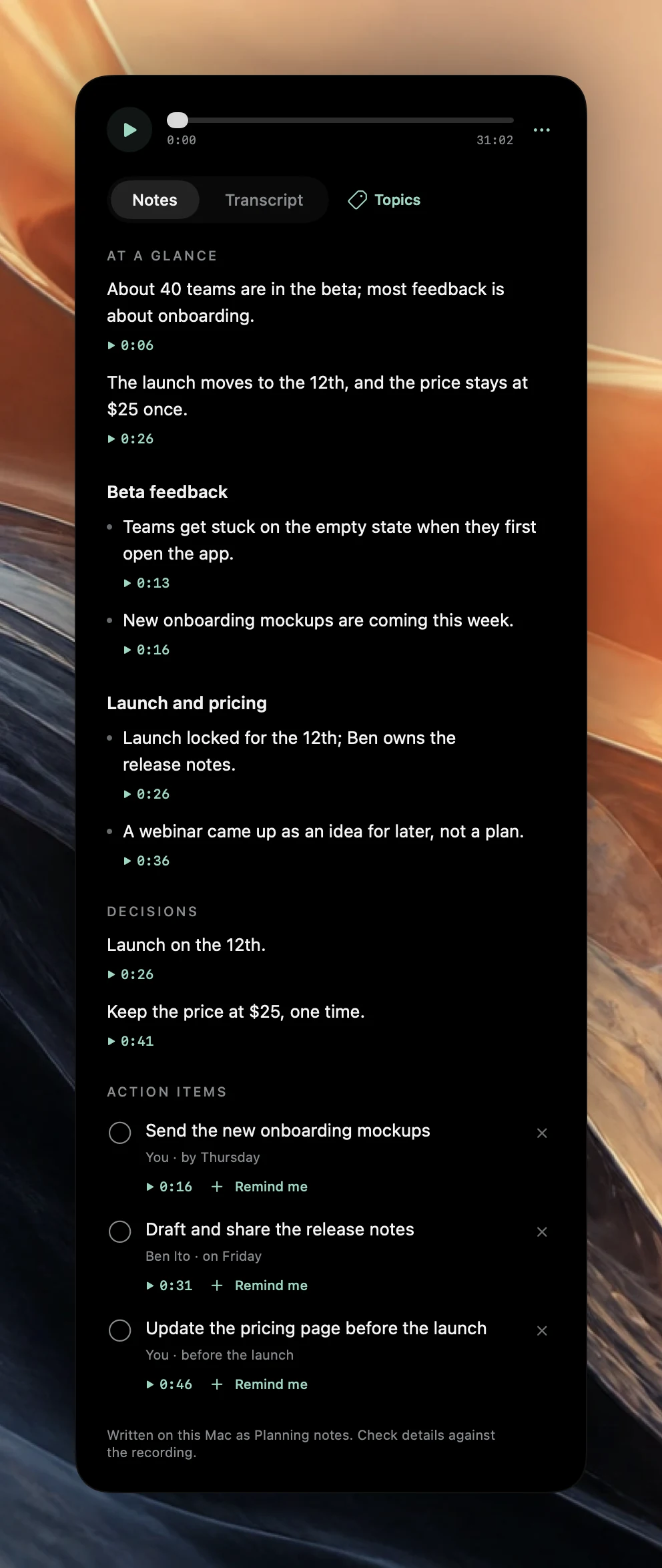
How Poffle's planning template works
Poffle uses its planning template when a meeting's title contains “planning”, “sprint”, “retro” or “retrospective”, “roadmap”, “kickoff” or “OKR”. The notes add the sections Goals, Scope, Risks and Owners and dates, and the template asks the on-device model to record owners and dates as they were stated.
The rest of the notes follow the rules above. Decisions contains only what was explicitly agreed. Action items holds commitments and accepted requests, at most eight, and when there are more, the ones with an owner or a deadline are kept first. A deadline appears only if someone said it. Each point has a timestamp that plays its source, and the line under the notes reads “Written on this Mac as Planning notes. Check details against the recording.”
Two habits make the notes better. Press Control-Option-B, or click Mark moment, when the team agrees the goal; marked moments are covered in the notes, so the goal is easy to find again. And name the speakers in Transcript after the meeting, because action owners follow the speaker names. See how to mark moments while recording.
Use the notes mid-sprint
When the scope question comes up, search instead of scrolling. Poffle's meeting search looks through notes, actions and transcripts, and with Apple Intelligence it can answer a question like “What did we leave out of sprint 14?” from your saved meetings, with links to the sources. See how to ask about your meeting notes.
If a planning meeting's title has none of the keywords, open the meeting's options menu and choose Rewrite notes as > Planning. The templates guide explains automatic detection and the other styles. Recordings, transcripts and notes stay on your Mac.
Sources
Official documentation and references used in this guide.