POFFLE FOR MAC
Your tools.At the edge.
Your clipboard, calendar and meeting notes.
A little rail for the things you do all day.
 PoffleMade for MacmacOS 26 or later · Apple silicon
POFFLE FOR MAC
Your clipboard, calendar and meeting notes.
A little rail for the things you do all day.
PINNING
Drag the rail left to pin it open.
Drag again to unpin and hide it.
CALENDAR
See your next event and today's schedule.
Open an event for details or to join.
MEETING COUNTDOWN
A countdown appears before your meeting.
Set when it starts and how long it stays.
VOICE RECORDER
Record a voice note from the rail.
Your recording is saved in the library.
LOCAL TRANSCRIPTION
Search your transcripts and click a passage
to play the recording from that point.
NOW PLAYING
See what's playing on your Mac.
Control playback without switching apps.
AUDIO SPECTRUM
The spectrum reacts to your audio
and uses colors from the artwork.
CLIPBOARD
Search your clipboard history and paste
into your app. Save favourites for later.
FILE TRAY
Collect files in the tray, then drag them
into another app together.
CUSTOMIZATION
Choose which tools appear in your rail
and drag them into the order you want.
MEETINGS · RECORD
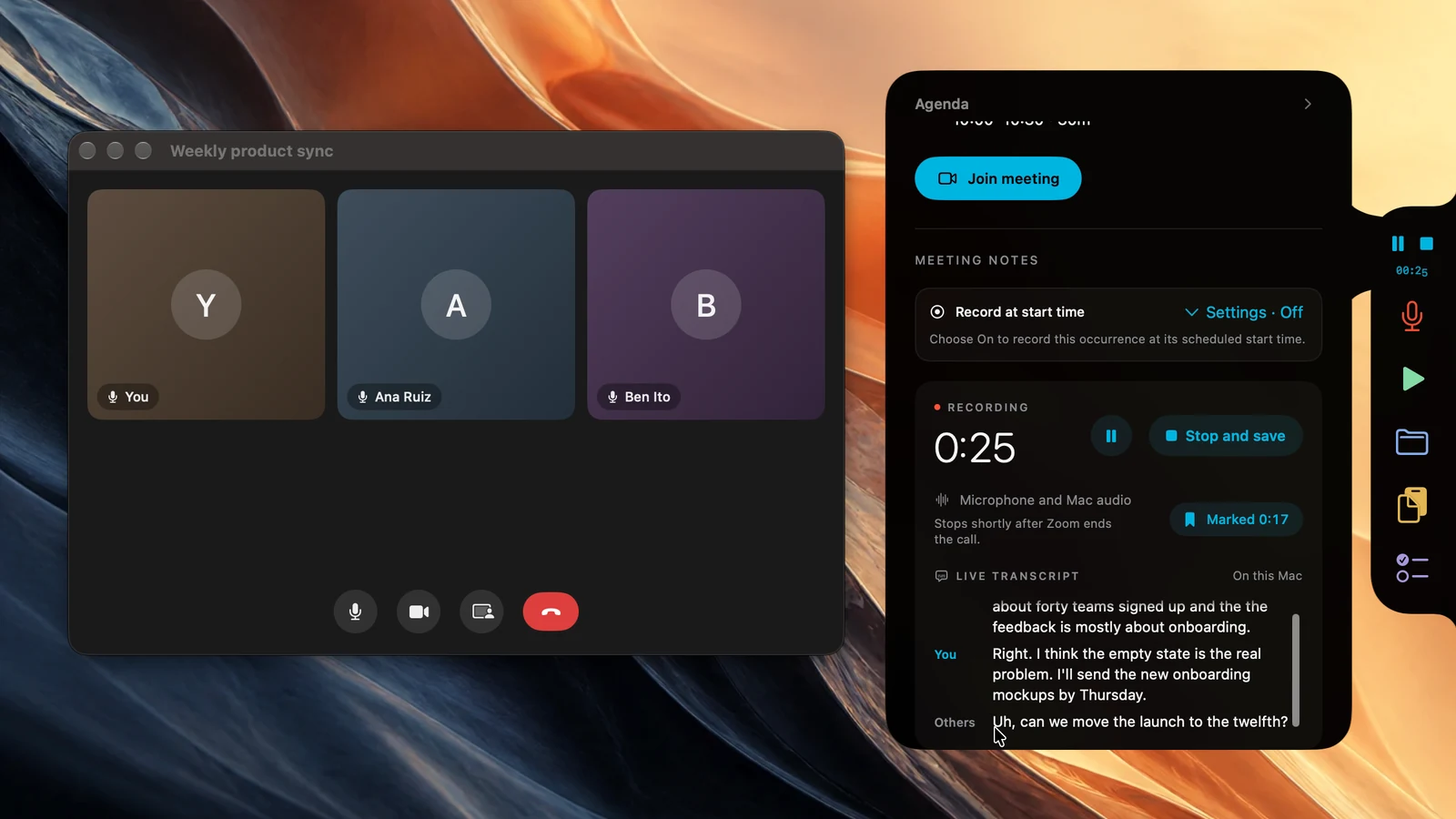
When a call starts, Poffle offers to record it. Follow the live transcript, mark a moment, and recording stops when the call ends.
Your recording stays on your Mac.MEETINGS · NOTES
A map shows who spoke when and where each topic starts. Decisions and action items with owners come first. Read the transcript clean, or exactly as it was said.
Summaries use Apple Intelligence.MEETINGS · SEARCH
Ask your meetings a question. Poffle answers from your saved notes and transcripts, with sources you can open.
Answered on your Mac.MEETINGS · FOLLOW THROUGH
Turn an action item into a reminder. Poffle peeks when it’s due, and next week’s meeting starts with what’s still open.
A little nudge, while you’re at your Mac.Recordings and transcripts stay on your Mac. Speech and speaker models download when needed. Summaries require Apple Intelligence enabled and a supported language.
Included with Poffle.SETTINGS
Choose your tools, arrange their order, and pick individual colors or a monochrome look.
PRICING
Seven days with every Pofflet. Add a card to start, with nothing due today. After your trial, we automatically charge $25 once, plus tax, for lifetime access. Cancel before then to pay nothing. Cancelling ends trial access immediately.
Already have Poffle? Start your trial here, then paste your key in the app.
$25$25once
{percent}% off with {code}
Use the email address for your Poffle license.
Your code will be checked at checkout.
Card required · $0 today · No subscription
Manage your trial or licenseQUESTIONS
Privacy, languages, permissions and pricing, in short. Anything else? Write to support@poffle.app.
Your recordings, transcripts, notes, clipboard history and files stay on your Mac. Transcription and speaker labels run locally, and summaries use Apple’s on-device model. There is no cloud transcription or summary service. Poffle goes online to check your license and updates, and to download speech and speaker models when needed.
Yes. Overviews, decisions and action items use Apple Intelligence, so it must be turned on and support your meeting’s language. Without it, recordings, transcripts, speaker labels and search still work.
Every language Apple’s on-device speech recognition supports on your Mac. Choose one in Settings › Speech or follow your system language. Each language downloads once, then recordings are transcribed on your Mac.
Only what a feature needs, when you first use it. Meetings need Microphone and system audio recording; voice notes need the Microphone. Agenda asks for Calendar, and Reminders is requested when you connect it or send an action there. Accessibility lets Poffle paste clipboard items directly into your apps. The Now Playing spectrum can also use system audio, processed in memory and never saved.
$25 once, plus applicable tax. It is not a subscription. A license is for one person on up to two Macs, for personal and commercial use, and includes all future Poffle updates.
Add a card to start seven days with every Pofflet. Nothing is due today, and you see the final total before your trial starts. Unless you cancel, $25 plus tax is charged once after seven days. Cancelling stops the charge and ends trial access immediately. Your saved content stays available.
A Mac with Apple silicon and macOS 26 or later. Meeting summaries also need Apple Intelligence. Connect to the internet to start your trial, and at least once every 30 days to verify your license.
Choose your tools and arrange your rail.
Set the colors, sounds and activity peeks.