
Raw speech recognition is hard to read. Sentences arrive in fragments, “um” and “uh” are everywhere, a word is repeated while someone thinks, and on a call without headphones half of what the others said turns up a second time under your name. Poffle tidies the transcript of a recorded meeting on your Mac, without changing what anyone said, and keeps the exact recognised wording one click away.
Paragraphs by speaker
Open a meeting and choose Transcript. Poffle groups consecutive passages from the same speaker into one paragraph, as long as the pauses between them are at most 4 seconds, up to 90 seconds per paragraph. A new speaker, or a longer pause, starts a new one.
Each sentence keeps its own timing. Click a sentence to play the recording from there, or click the time at the top right of a paragraph to play it from the start. The sentence being played is highlighted, so you can read along.
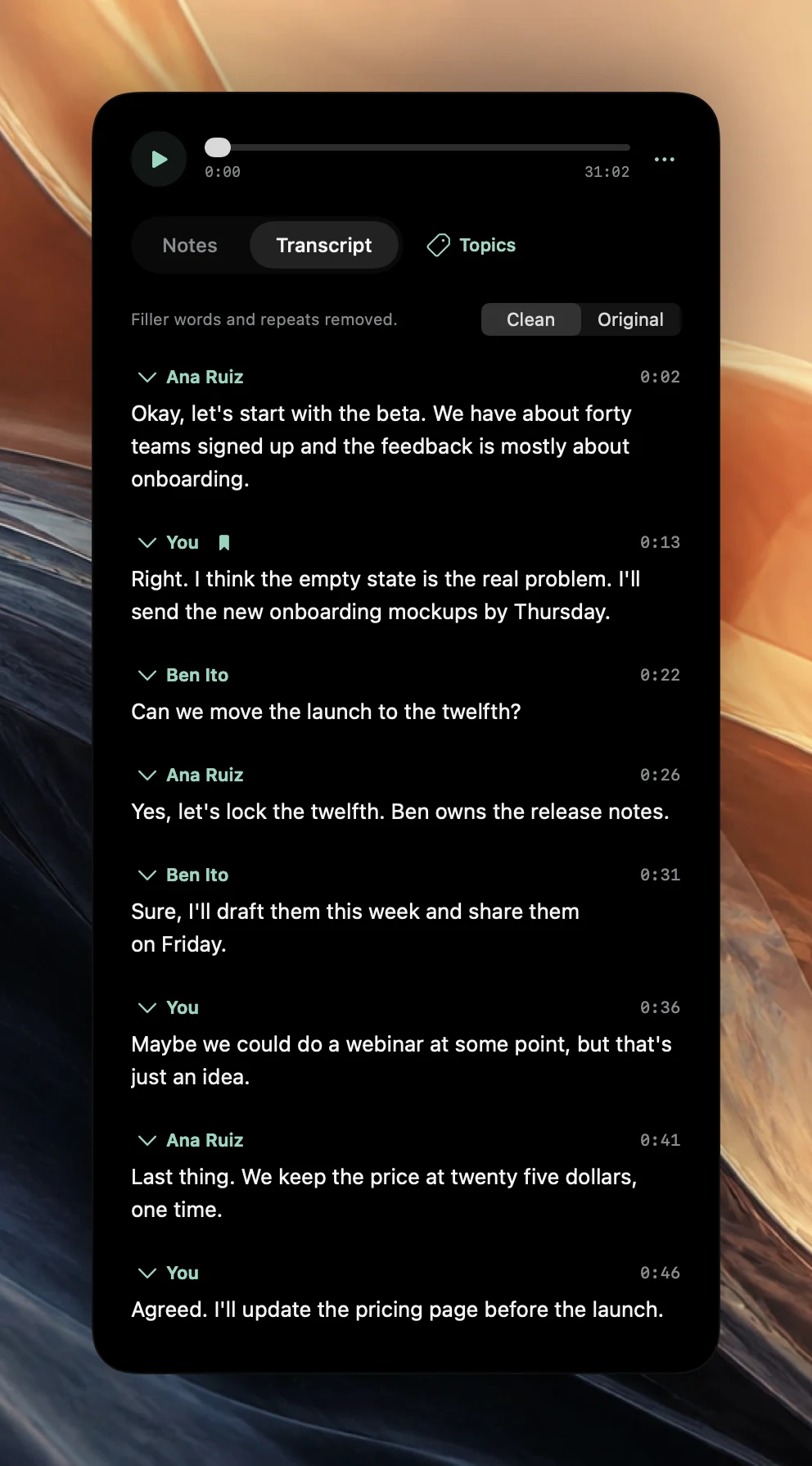
Clean or Original
Above the transcript, a switch offers Clean and Original. Clean, labelled “Filler words and repeats removed.”, is the default. Original shows the text “Exactly as recognized.” Poffle remembers your choice for the next meeting you open.
Clean removes:
- Standalone filler sounds such as “um”, “uh” and “hmm”. Each of the 16 languages Poffle supports has its own list, with fillers such as “øh”, “euh”, “ehm”, “えーと” and “嗯”. A filler that is also a word, such as Japanese “あの” (“that”), is removed only where it is clearly a filler, for example before a comma.
- Words or short phrases repeated immediately, as in “we, we, we should”.
It then repairs the punctuation and capital letters that those removals leave behind. Clean keeps words that can carry meaning, such as “like”, “so” and “you know”, real repeats such as “that that” or “had had”, numbers and acronyms. A repeated content word is merged only when it comes three times or more. In Korean, Turkish and Vietnamese, where doubling a word is part of the grammar, as in “yavaş yavaş”, only doubled function words such as pronouns and conjunctions are merged. In any other transcription language, only “uh”, “uhm” and “hmm” are removed, because “um” and “er” are real words in some languages, and only repeated phrases are merged.
Clean is a view, not an edit. The saved transcript still holds the recognised wording, which is what Copy transcript and the Markdown export use. Copy passage, in the Control-click menu of a paragraph, copies the wording you see.
Echo from the speakers
If you take a call on the Mac's speakers, your microphone also hears the other people. Without correction, their words would appear twice: once from the Mac audio and again under You.
After both tracks are transcribed, Poffle compares them. A microphone passage of four words or more is left out when at least 65% of its words appear in the same order in the Mac audio within 1.5 seconds, and the two overlap in time for at least half the passage. Passages of two or three words must match completely and overlap for 80% of their length. When this happens, the meeting shows “Meeting audio picked up by the microphone was left out of the transcript. Headphones avoid this.”
This is not echo cancellation. Single words, partial echo and echo mixed with your own voice can remain. If you answer with the same words someone just said, a little later, your reply is kept. The Mac audio's copy of those words stays in the transcript, so nothing the other side said is lost. The reliable fix is headphones: then the microphone hears only you.
Name the speakers
Your microphone is labelled You. After the meeting, Poffle separates the voices in the Mac audio on this Mac and labels them Speaker 1, Speaker 2 and so on. When the recording is linked to a calendar event, the number of attendees sets an upper limit, so one person's voice is less likely to be split into two speakers.
- Click a speaker's name above one of their paragraphs.
- Choose an attendee under From this calendar event, or choose Enter a name….
- Check a few paragraphs by playing them. The name applies to every paragraph of that speaker in this meeting.
Action owners follow the rename, so “Speaker 2” in the notes becomes the name you chose. Speaker separation is probabilistic. Overlapping or very brief speech can stay unassigned rather than being given a guessed identity, and Poffle never infers who someone is from the attendee list. Everyone captured by your microphone, including other people in the room with you, is labelled You.
Languages on this Mac
Poffle's interface is available in 16 languages, chosen because meetings can be transcribed and summarised on the Mac in each of them: English, Danish, Dutch, French, German, Italian, Japanese, Korean, Norwegian, Portuguese, Spanish, Swedish, Turkish, Vietnamese, Simplified Chinese and Traditional Chinese.
Most of these use Apple's SpeechTranscriber, the on-device model Apple built for long recordings such as meetings. Danish, Dutch, Norwegian, Swedish, Turkish and Vietnamese use Apple's on-device dictation model, DictationTranscriber, instead. It also gives word timing, so playback and paragraphs work the same way. Expect less punctuation in those languages, which can make sentences run together, and check names and numbers with particular care.
Set Settings > Speech > Transcription > Language to the language spoken in the meeting before you record. System language follows your Mac. Each language downloads once, the first time you use it, and then works offline. A meeting in two languages is transcribed in the selected one, so the other language will come out poorly.
Start with a clean recording
- Wear headphones on calls. It removes the main source of echo.
- Use the same microphone in the call app and on the Mac. Poffle records the Mac's default input.
- Mute music and notification sounds. Poffle records all of the Mac's audio, not only the call.
- Say names clearly the first time. They help when you assign speakers later.
- In a room, put the Mac where it hears everyone, and tell everyone you are recording.
A cleaner transcript makes for better meeting notes and better answers when you ask questions about your meetings. Apple explains the speech technology behind it in its SpeechAnalyzer session. You can download Poffle and compare Clean and Original on your own recording.
Sources
Official documentation and references used in this guide.