
Fireflies.ai is built around its notetaker bot, Fred. You invite it to a meeting, or let it join your calendar meetings automatically, and it records, transcribes and summarizes from Fireflies' cloud. It connects to a long list of CRMs and work tools, which is why sales teams like it. If you would rather not send a bot to your meetings, or keep recordings off a server, Poffle is the Mac alternative.
Fireflies.ai and Poffle at a glance
| Feature | Poffle | Fireflies.ai |
|---|---|---|
| Price | $25 once, plus tax, for up to 2 Macs | Pro $18 a month, or $10 a month billed yearly, per seat |
| Free option | 7-day trial | 3 meeting transcriptions for new accounts unless calendar auto-join is on. 400 minutes of storage per team |
| Meeting bot | None. Records your Mac's microphone and call audio | A bot (Fred) by default. Bot-free desktop app available |
| Where audio is transcribed | On your Mac | Fireflies' cloud (AWS and Google Cloud, United States) |
| Where notes are kept | On your Mac | Fireflies' cloud |
| In-person meetings | Yes, with your Mac's microphone | Yes, with the mobile app |
| Platforms | Mac with Apple silicon, macOS 26 or later | Mac, Windows, iOS, Android, web, Chrome |
| Transcription languages | 40+ on device. Notes need Apple Intelligence in that language | 100+ |
| Ask across meetings | Yes, answers cite the meeting | Yes, limited on the free plan |
| Team sharing and integrations | Share or export notes as Markdown. No team workspace | Channels and team workspaces. HubSpot, Salesforce, Slack, Notion and more on Pro and up |
| Also included | Clipboard history, file tray, calendar countdown, voice notes, notes, reminders, calculator, media controls | Meeting tools only |
Checked on October 21, 2026 on each company’s own website. Plans and prices change, so check before you decide.
A participant in the call, or nothing at all
Fred appears as a participant, so everyone sees it, and some companies block outside bots. Fireflies now also has a desktop app for Mac and Windows that records your system audio without the bot, and it does not save audio or video in that mode.
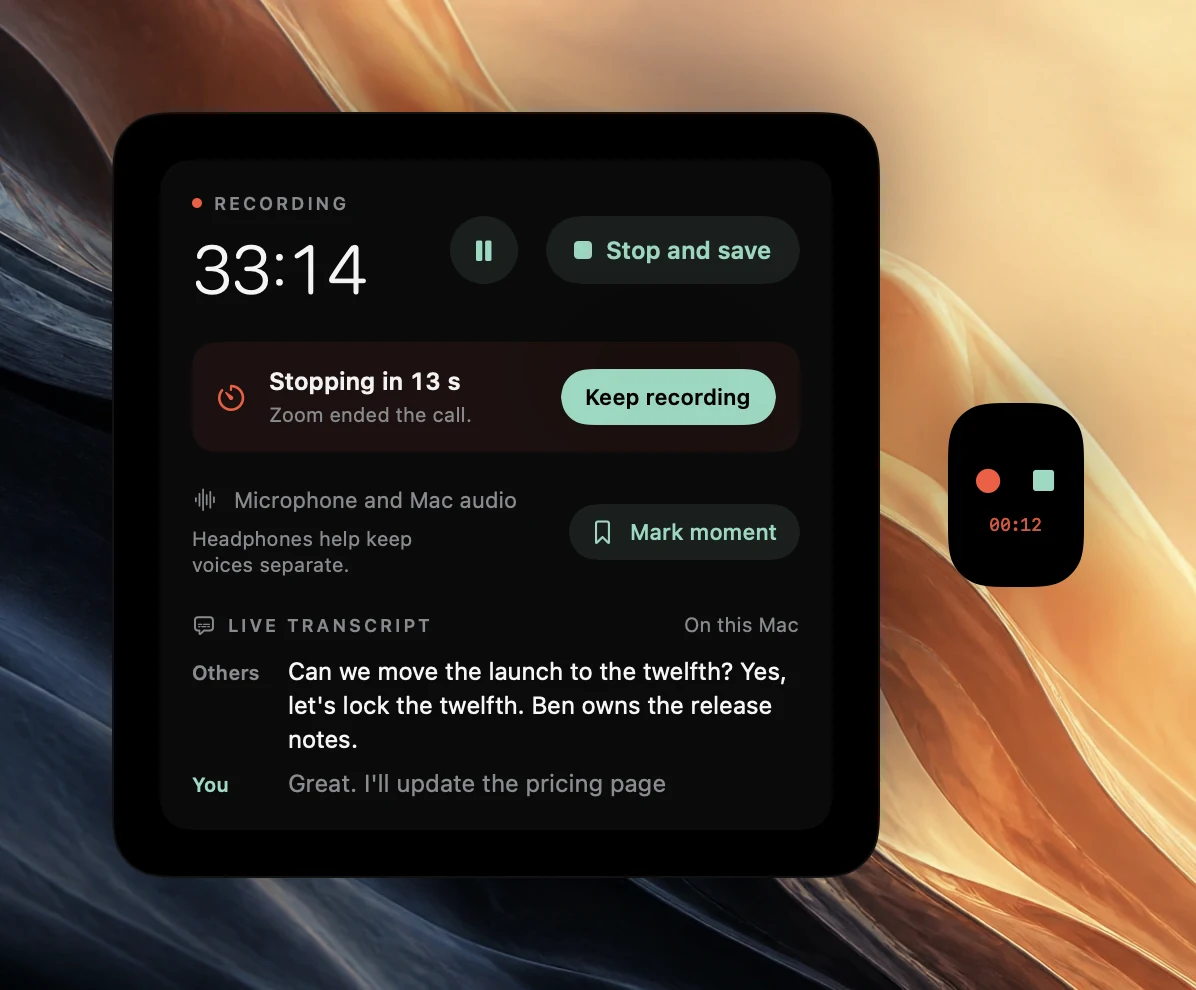
Poffle never joins a meeting. It notices when Zoom, Teams, Meet in a browser, FaceTime, Slack, Webex or Discord starts a call, asks before recording, and stops by itself shortly after the call ends. Because nothing appears in the call, let the other people know before you record.
Where your meetings go
Fireflies stores and processes data in its cloud in the United States, on Amazon Web Services and Google Cloud, and says it does not train on your data by default. Poffle transcribes with Apple's on-device speech recognition and writes notes with Apple Intelligence, so recordings, transcripts and notes stay on your Mac.
Notes and follow-through
Poffle writes notes in sections with decisions and action items, including the owner and due date when someone said one, and every point links to its moment in the recording. Turn an action into a reminder in Apple Reminders, ask a question across your meetings and get an answer with sources, and see what is still open before the next meeting in a series. How Poffle writes meeting notes goes through it.
Where Fireflies is the better fit
Fireflies transcribes more than 100 languages, runs on Windows, the web and phones, and syncs with HubSpot, Salesforce, Slack, Notion and more on its paid plans, with channels and team workspaces. For a sales or customer team that lives in a CRM, that is hard to replace. Poffle is a Mac app for one person, transcribes more than 40 languages on your Mac, and shares notes by copy, email or Markdown export.
Price
Fireflies Pro costs $18 a month per seat, or $10 a month billed yearly, which is $120 a year. On the free plan, accounts created from September 1, 2026 get three meeting transcriptions unless calendar auto-join is turned on, and storage is 400 minutes per team. Poffle is $25 once for one person on up to two Macs, with all future Poffle updates included.
More than a note taker
The same license includes every other Pofflet on Poffle's rail:
- Agenda counts down to your next meeting at the edge of the screen, opens its link, and shows what was left open last time. See a meeting countdown on your Mac.
- Capture records voice notes and transcribes them on your Mac, and keeps your meeting library. See transcribing voice recordings.
- Clipboard keeps a searchable history of what you copy, with favourites and paste without formatting. See clipboard history on Mac.
- File tray holds files while you move them between apps, windows and Spaces. See moving files between apps.
- Notes, Reminders, Calculator and Now playing for quick notes, your Apple Reminders lists, calculations with history and media controls.
Try Poffle
Poffle runs on a Mac with Apple silicon and macOS 26 or later. Notes and answers use Apple Intelligence, so it needs to be turned on and to support the meeting's language; recordings and transcripts work without it. The trial gives you seven days with every Pofflet. You add a card to start, nothing is due today, and you can cancel before the trial ends to pay nothing. After that it is $25 once, plus tax, for one person on up to two Macs, with all future Poffle updates included.
Download Poffle, open it, and let it offer to record your next call. Let everyone on the call know before you record.
Sources
Official documentation and references used in this guide.