
Granola showed that meeting notes do not need a bot in the call. It listens to your computer's audio, and its notes are good. Poffle works the same way in the meeting. The difference is what happens next: Granola sends the audio to a transcription service and keeps your notes and transcripts in its cloud, while Poffle does all of it on your Mac. The other difference is the price.
Granola and Poffle at a glance
| Feature | Poffle | Granola |
|---|---|---|
| Price | $25 once, plus tax, for up to 2 Macs | Business $14 a month per user, billed monthly |
| Free option | 7-day trial | Free plan. Notes older than 30 days stay locked until you upgrade |
| Meeting bot | None. Records your Mac's microphone and call audio | None. Records your computer's audio |
| Where audio is transcribed | On your Mac | A cloud transcription provider. Audio is deleted afterwards |
| Where notes are kept | On your Mac | Granola's cloud (AWS, United States) |
| In-person meetings | Yes, with your Mac's microphone | Yes, with the mobile apps |
| Platforms | Mac with Apple silicon, macOS 26 or later | Mac, Windows, iOS, Android |
| Transcription languages | 40+ on device. Notes need Apple Intelligence in that language | 31 on desktop, 17 on mobile |
| Ask across meetings | Yes, answers cite the meeting | Yes |
| Team sharing and integrations | Share or export notes as Markdown. No team workspace | Shared folders and Spaces. Slack on all plans, Notion, HubSpot and more on Business |
| Also included | Clipboard history, file tray, calendar countdown, voice notes, notes, reminders, calculator, media controls | Meeting tools only |
Checked on October 21, 2026 on each company’s own website. Plans and prices change, so check before you decide.
Both skip the meeting bot
Neither app joins your call. Granola runs on your computer and uses your system audio and microphone. Poffle does the same, and also notices when a call starts and offers to record it, so you do not have to remember. When the call ends, Poffle stops by itself after a short countdown. Either way, let the people in the meeting know you are recording.
The cloud or your Mac
Granola passes audio straight to its transcription provider and deletes it once the transcript is ready. Notes and transcripts are stored on Amazon Web Services servers in the United States, and kept until you delete them or set an auto-deletion period. On the free and Business plans, Granola may use anonymised data to improve its models unless you opt out.
Poffle transcribes with Apple's on-device speech recognition and writes notes with Apple Intelligence on your Mac. Recordings, transcripts and notes stay on your Mac, with nothing to opt out of. If your meetings cover clients, health, money or hiring, that is often the deciding difference.
Notes you can act on
Poffle's notes come in sections, with decisions and action items with an owner and a due date when someone said one. Every point links to the moment it came from. One click on Remind me turns an action into a reminder in Apple Reminders, and before the next meeting in a series, Agenda shows what was decided last time and what is still open.
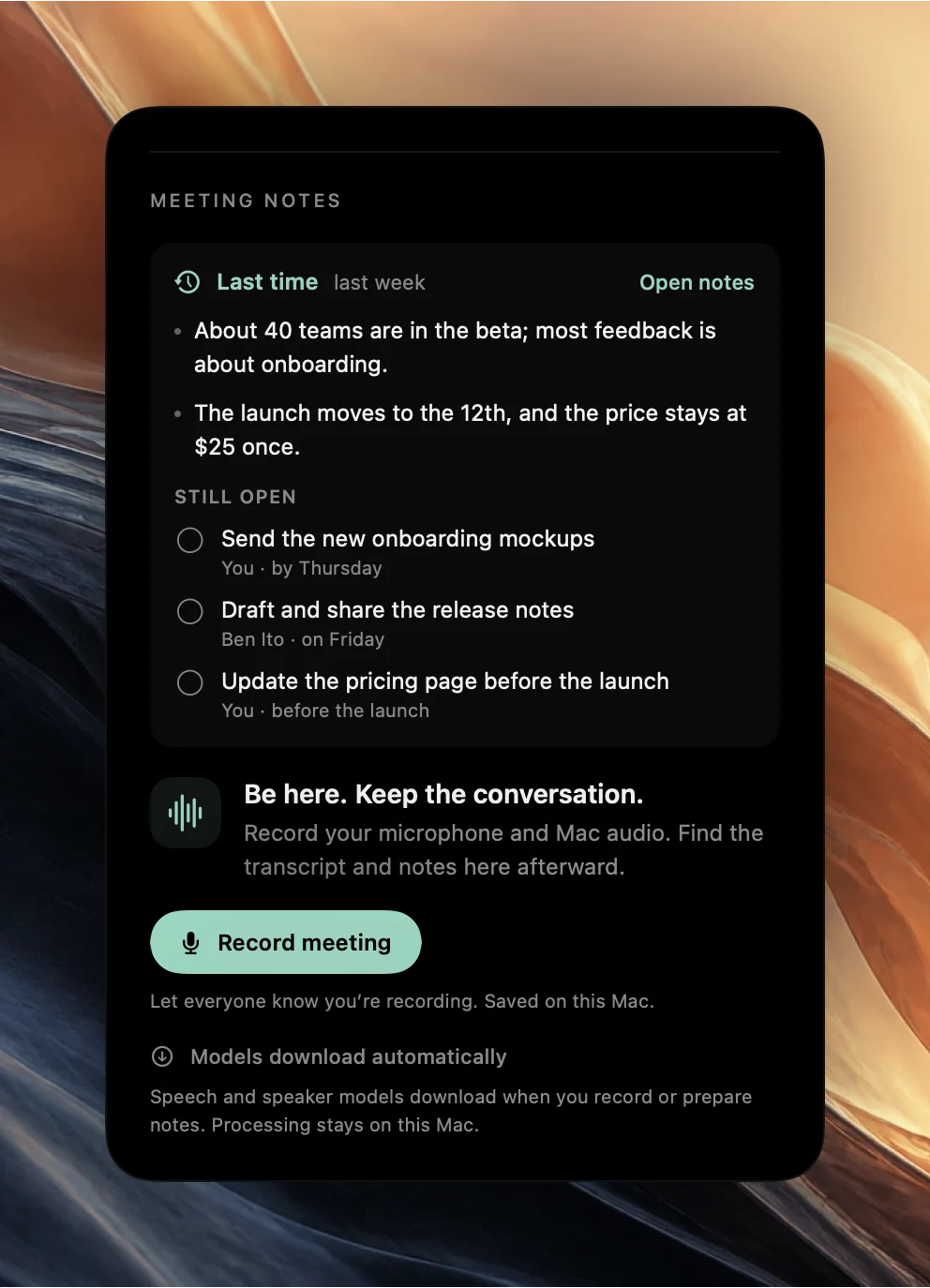
You can also ask a question across all your meetings and get an answer that cites the meeting and passage it came from. Granola has chat across meetings too, and it offers templates and saved prompts called Recipes.
Where Granola is the better fit
Granola runs on Windows, iPhone and Android as well as the Mac, has shared folders and Spaces for teams, and connects to Slack on every plan and to Notion, HubSpot, Attio and more on Business. If your team works across platforms or wants notes in a shared workspace, Granola does that well. Poffle is a Mac app for one person: you share notes by copying them, emailing them or exporting Markdown.
Price
Granola's free plan shows the last 30 days of meetings; older notes stay locked until you upgrade. Business costs $14 a month per person, billed monthly, which is $168 a year. Poffle is $25 once for one person on up to two Macs, with all future Poffle updates included.
More than meeting notes
Poffle is a set of small tools, called Pofflets, on a rail at the edge of your screen, and the meeting tools are only part of it:
- Agenda counts down to your next meeting at the edge of the screen, opens its link, and shows what was left open last time. See a meeting countdown on your Mac.
- Capture records voice notes and transcribes them on your Mac, and keeps your meeting library. See transcribing voice recordings.
- Clipboard keeps a searchable history of what you copy, with favourites and paste without formatting. See clipboard history on Mac.
- File tray holds files while you move them between apps, windows and Spaces. See moving files between apps.
- Notes, Reminders, Calculator and Now playing for quick notes, your Apple Reminders lists, calculations with history and media controls.
Try Poffle alongside Granola
Poffle runs on a Mac with Apple silicon and macOS 26 or later. Notes and answers use Apple Intelligence, so it needs to be turned on and to support the meeting's language; recordings and transcripts work without it. The trial gives you seven days with every Pofflet. You add a card to start, nothing is due today, and you can cancel before the trial ends to pay nothing. After that it is $25 once, plus tax, for one person on up to two Macs, with all future Poffle updates included.
Download Poffle, open it, and let it offer to record your next call. Let everyone on the call know before you record.
Sources
Official documentation and references used in this guide.